PE
PE Proper LEGAL CASE SUITE
peproper.legalcasesuite.com
βš–οΈ DIVORCE PROPERTY CALCULATOR, ASSET INVENTORY & EQUALIZATION SOFTWARE

Organize Divorce Property, Compare Allocations & Build Professional Property Schedules

Build a divorce property inventory of assets and debts, record each party’s claimed classifications and contributions, compare proposed allocations and draft equalization amounts, collect photos through share links, and export property schedules for attorney or mediator review.

πŸ’‘ Draft calculations are based on user-entered information, classifications and selected assumptions. PE Proper does not provide legal advice or determine legal entitlement. Professional review is required where appropriate.
πŸš€ Start Free 🎬 Watch 2-Min Demo πŸ“… Request a Professional Demo
Real-Time
Draft Equalization Updates
Multi-State
Community Property & Equitable Distribution
PDF β€’ Excel β€’ CSV
Draft Reports & Data Exports
πŸ’Ό LAW FIRM & MEDIATOR DEMO

See PE Proper With a Sample Matter

15-minute demonstration. No obligation.

πŸ“… Request a Professional Demo β†’

βš–οΈ Notice: PE Proper is software, not a law firm, and does not provide legal advice. Results depend on user-entered information and selected assumptions and require independent review.

FOR INDIVIDUALS & SPOUSES

Organizing My Own Property

Build a personal property inventory, compare scenarios and prepare organized information for professional review.

FOR LEGAL PROFESSIONALS

Attorney, Mediator or Legal Professional

Manage property matters, participant intake, allocation scenarios, professional reports and team workflows.

⚑ WORKFLOW COMPARISON

How PE Proper Transforms Property Division

Replace fragmented spreadsheets and email threads with a single structured property workspace.

❌

Traditional Workflow

  • β€’ Disorganized Excel property lists
  • β€’ Emailed photographs & lost attachments
  • β€’ Confusing multiple file versions
  • β€’ Separate un-linked debt lists
  • β€’ Error-prone manual allocation calculations
  • β€’ Manually assembled schedule reports
✨

With PE Proper

  • βœ“ Structured matter property inventory
  • βœ“ High-resolution item-linked photographs
  • βœ“ Authorized participant QR & link intake
  • βœ“ Side-by-side proposed allocations
  • βœ“ Live real-time draft equalization updates
  • βœ“ Professional PDF, Excel & CSV reports

πŸ“Š PE Proper vs. Excel: Works Alongside Your Spreadsheets

PE Proper is not an attack on Excel β€” Excel remains a valuable calculation tool, and PE Proper allows exporting your matter inventory directly to Excel (.xlsx) at any time. PE Proper simply delivers the specialized property-division workflow spreadsheets cannot provide naturally: item-linked photos, password-free mobile participant intake links, verified EXIF metadata removal for supported uploaded images, live settlement scenario comparison, and Professional property schedules, with custom firm branding available on Team plans.

πŸŽ₯ PRODUCT TOURS & INTERACTIVE DEMO

See the PE Proper Divorce Property Workflow in Action

See how PE Proper builds a divorce asset-and-debt inventory, collects property photos, records claimed classifications and contributions, compares proposed allocations and draft equalization amounts, and produces reports for professional review.

PRODUCT TOUR 1 CAPTIONS, TRANSCRIPTS & ACCESSIBILITY

Divorce Property Inventory & Scenario Comparison Tour

Watch how PE Proper records property items, applies user-selected classifications and allocation assumptions, compares draft scenarios, and generates property-schedule PDFs for professional review.

πŸ“Ί Featured: Property Inventory & Allocation Scenarios
PRODUCT TOUR 2 PHOTO UPLOADS, SHARING & PRIVACY

Remote Property Photo Upload & Sharing Tour

Demonstrates remote participant share links, mobile photo uploads, available privacy settings, and backup and export options.

πŸ”’ Featured: Mobile Photo Uploads, Sharing Controls & Exports
πŸ“± PROPERTY PHOTO UPLOADS IN ACTION

Collect Property Photos with Mobile Share Links

⚑ No App Required: Participants can submit property from a phone browser β€” no app installation required.

Authorized participants can use a share link to submit property photos from a smartphone camera or webcam. Review configured access and privacy settings before distributing links or uploading images.
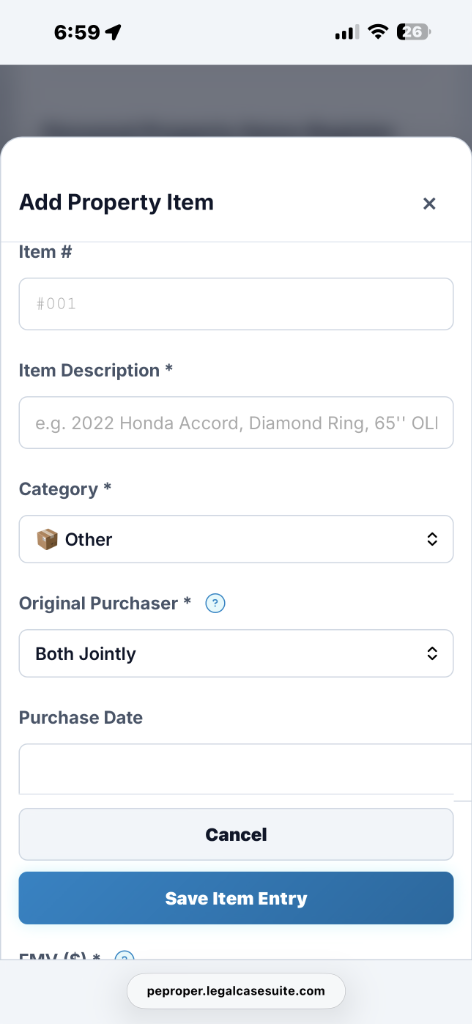
PE Proper Mobile Property Photo Upload Interface
PE
INTERACTIVE DIVORCE PROPERTY DEMO

Interactive Divorce Property Workflow Tour

STEP 1 / 5 β€’ PARTICIPANT ACCESS & COLLABORATION πŸ“± Assigned Participant Links & Mobile QR

Assigned Share Links & Mobile Property Cataloging

Create assigned share links or QR codes for authorized participants to submit property information and photos. Link availability, revocation, permissions, and attribution depend on the configured controls and the link used for submission.

πŸ”—
Authorized Participant Link
● Assigned Link Active
↔
πŸ“±
Mobile Access QR Code
Submit Photos & Property Values
STEP 2 / 5 β€’ CLAIMED CLASSIFICATIONS & CONTRIBUTIONS 🎁 Gifts & Β§ 2640 Claims

Gift Classifications & Supporting Documentation

Record claimed gifts and other classification positions, add supporting notes and evidence, and see how user-selected treatment affects draft scenarios. Classification and potential reimbursement depend on applicable law, facts, and professional review.

🎁 Personal Gift Ring
Selected Scenario Treatment: $0.00 Included in Equalization
πŸ”„ Retitled Pre-Marital Home
Selected Β§ 2640 Claim: 100% Contribution Entered
STEP 3 / 5 β€’ PROPERTY ALLOCATION SUMMARY β­• Allocation Visual Summary

Divorce Property Allocation & Equalization Summary

Review a visual summary of item counts, entered values, selected allocations, and draft equalization totals for each party.

● Outer Ring: Property & Gift Items Count
● Inner Ring: Optional 50/50 Comparison Baseline
STEP 4 / 5 β€’ WHAT-IF SETTLEMENT SCENARIOS πŸ”€ "What-If" Balance Testing

Divorce Asset & Debt Allocation Scenarios

Compare proposed asset and debt allocations during mediation or settlement conferences, review how selected assumptions change draft equalization amounts, and save named working scenarios for professional review.

πŸ”€ Draft Equalization Amount: $14,500.00
πŸ’Ύ Save Proposal Draft
STEP 5 / 5 β€’ PROFESSIONAL REPORTS & DATA EXPORTS πŸ“Š Property Schedule PDF & Data Exports

Divorce Property Reports & Data Exports

Generate draft property schedules, photo reports, valuation summaries, and Excel or CSV exports for attorney or mediator review and revision.

πŸ“„
Professional Property Schedule PDF
πŸ“ˆ
Excel (.xlsx) Workbook
πŸ“
Google Docs Report
DIVORCE PROPERTY WORKFLOW FEATURES

Divorce Property Tools for Spouses, Mediators & Attorneys

PE Proper is software, not a law firm, and does not provide legal advice. Results depend on user-entered information and selected assumptions and require independent review.

βš–οΈ

State-Specific Divorce Property Reference Tools

State-specific information is provided for research and workflow assistance and must be independently reviewed for applicability and currency.

Provides configurable reference fields and draft calculations for organizing information related to community-property division, claimed separate-property contributions, and gift classifications.

🏷️

Asset Classification & Working Positions

Record each party’s claimed marital, community, separate, gift, or transmuted classification for assets and debts, with supporting notes and evidence uploads. These entries are working positionsβ€”not legal determinations.

πŸ”„

Separate-Property Contributions & Potential Reimbursements

Track claimed premarital funds and separate-property contributions, then compare potential reimbursement scenarios. Eligibility and remedies depend on applicable law, evidence, and professional review.

πŸ“±

Mobile Property Inventory & Photo Collection

Authorized participants can use assigned links or QR codes to submit property information from mobile phones or tablets. Attribution depends on the link used and configured controls.

πŸ”€

Equalization Calculations & Allocation Scenarios

Move assets and debts between proposed allocations and see the draft equalization amount update in real time. Results are mathematical outputs based on entered values and selected assumptionsβ€”not court predictions or legal conclusions.

πŸ›οΈ

Divorce Property Reports & Data Exports

Export divorce property schedules, asset-and-debt inventories, valuation summaries, and allocation comparisons for review and revision by an attorney or mediator.

πŸ›οΈ COMMUNITY PROPERTY & EQUITABLE DISTRIBUTION WORKFLOWS

Divorce Property Workflows with Configurable Jurisdiction References

PE Proper includes configurable references and draft calculation fields for Community Property and Equitable Distribution workflows. Users must independently review citations, reimbursement assumptions, and document formatting for the applicable jurisdiction.

COMMUNITY PROPERTY REFERENCES CA, TX, WA, AZ, NV, NM, ID, LA, WI

Optional 50/50 Comparison Scenario

The optional 50/50 baseline is a user-selected comparison scenario, not a statement of legal entitlement. Property classification, division, and potential reimbursement rights depend on applicable law, supporting evidence, and professional review.

  • βœ“ California: Reference: Fam. Code Β§ 2640
  • βœ“ Texas: Reference: Fam. Code Β§ 3.006
  • βœ“ Washington: Reference: RCW 26.09.080
  • βœ“ Arizona & Nevada: References: A.R.S. Β§ 25-318 and NRS 125.150
EQUITABLE DISTRIBUTION REFERENCES NY, FL, IL, OH, PA, GA, NC, MI + 33 MORE

Inventory & Allocation Scenario Comparison

Users can organize asserted marital and separate-property classifications and apply an optional allocation baseline for comparison. Resulting equalization figures are draft mathematical outputs based on entered values and assumptionsβ€”not court awards, legal conclusions, or predictions.

  • βœ“ Florida: Reference: Fla. Stat. Β§ 61.075
  • βœ“ New York: Reference: NY Dom. Rel. Law Β§ 236(B)
  • βœ“ Illinois: Reference: 750 ILCS 5/503
  • βœ“ Ohio & Pennsylvania: References: ORC Β§ 3105.171 and 23 Pa.C.S. Β§ 3502
❓ DIVORCE PROPERTY SOFTWARE FAQ

Common Questions About PE Proper

Learn how PE Proper helps organize divorce-property information, collect photos, record claimed classifications and contributions, compare proposed allocations, and prepare draft reports.

πŸ“œ

How can PE Proper help organize information related to California Family Code Β§ 2640?

California Family Code Β§ 2640 generally addresses reimbursement claims for qualifying separate-property contributions to the acquisition of community property. Eligibility and calculation depend on statutory requirements, tracing, waivers, property characterization, and case-specific facts. PE Proper helps users organize contribution information and prepare draft calculations for professional review; it does not determine legal entitlement or calculate a legally binding reimbursement.

🎁

How can I record claimed gifts and gift classifications?

California law generally treats property acquired by gift as separate property, but the characterization of an inter-spousal gift can depend on the circumstances, evidence, and applicable transmutation requirements. PE Proper allows users to label an item as a gift and reflect that selected treatment in draft calculations and scenarios; it does not determine ownership, legal characterization, or the amount owed between the parties.

πŸ“±

How can an authorized participant upload property photos without my password?

Matter owners can create an assigned share link or QR code for an authorized participant. The recipient can use it to upload property photographs without receiving the account holder’s login credentials. Sharing permissions and access can be managed through the platform’s available controls.

πŸ”’

What privacy controls apply to uploaded photo metadata?

Photographs may contain location and other metadata depending on the device, file format, and camera settings. Uploaded photographs are processed according to PE Proper’s available metadata and privacy controls. Users should review source files and confirm that privacy-sensitive information has been removed before sharing or exporting photographs.

πŸ”€

How do allocation scenario comparisons affect my saved matter data?

The β€œWhat-If” feature allows users to compare different user-selected property allocations and see how those assumptions affect draft calculation results. Testing a scenario does not change the underlying saved matter data unless the user separately applies or saves changes through an available workflow. It is a comparison tool and does not recommend a settlement, predict a court outcome, or determine a legally correct division.

πŸ”

What backup and restoration options are available for matter data?

Where available, users can download an encrypted .peproper backup containing supported matter data. The contents and restoration results depend on the data included at the time of export and the compatible platform version used for restoration. Users should verify backups and maintain independent copies of important records; PE Proper does not guarantee recovery of every item, photograph, valuation, or deleted record.

πŸ›οΈ

What divorce-property reports and data exports can I generate?

PE Proper may generate draft property schedules, photo reports, and data exports in available formats such as PDF, Excel, and CSV. These outputs are working documents for professional review and are not official court forms, filed pleadings, court orders, discovery responses, or guarantees of acceptance. A licensed professional must review and adapt each export for the applicable jurisdiction, matter, and filing requirements.

βš–οΈ

IMPORTANT LEGAL DISCLAIMER & NOTICE

peproper.legalcasesuite.com β€’ Legal Case Suite β€’ Operated by VBDGS LLC

PE Proper is divorce and marital-property inventory, allocation-scenario, and draft equalization software operated by VBDGS LLC (peproper.legalcasesuite.com). It helps users organize assets and debts, record claimed classifications and contributions, compare proposed allocations, and prepare draft reports. PE Proper is NOT a law firm and DOES NOT provide legal advice, representation, opinions, or legal determinations. All outputs depend on user-entered information and assumptions and require professional review. Consult a qualified attorney licensed in the applicable jurisdiction for legal advice, case strategy, and statutory interpretation.

πŸ“œ Use of PE Proper is subject to the Terms of Use, Privacy Policy, and Legal Disclaimer. Please review these documents before creating an account or using the service.